Quality Review
Limited access This phase is currently under development and is only available to a limited number of organizations.
The Quality Review (QR) phase is part of the Kognic Standard Workflow, which aims to enable the delivery of sufficient-quality annotations on time and at the expected cost.
Goal
The phases' main goal is to ensure that the quality of the labels produced by Annotators align with the expectations of the Quality Managers (QMs) working in the request.
Users and Actions
The QR phase contains two actions, Review and Correct, which should be configured to contain different groups of users.
Annotators
To ensure the phase functions as expected, configure users who annotate data in Annotate phase with the Correct action in the QR phase. This ensures they are available for monitoring and configuration and that they receive correction tasks for the inputs they have labeled.

Reviewers
QMs responsible for data quality should be configured with the Review action. They will receive Review tasks that allow them to assess the quality of labels created by annotators in the request.

Monitoring
The primary monitoring tool for the QR phase is the Annotator Sampling table. It contains some basic user information (name, e-mail, organization and workforce) as well as some phase specific metrics and controls.

R1 (Round 1) Acceptance
The primary measure of Annotator label quality is the percentage of their sampled annotations accepted on first review by a QM during this phase.
Current Review Sample
This shows the percentage and absolute number of an annotator's work that has been reviewed and used to calculate the R1 acceptance ratio. The absolute numbers help you determine if the sample size is large or small for this specific request.
Alignment score
The alignment score indicate how well an annotator's work aligns with the established quality standards of the project. These scores help in assessing the annotator's performance and identifying areas for improvement. Read more about
Tooling
Various controls and tools are available to reviewers in the QR phase. These are mainly concerned with modifying how labels are sampled for review depending on the users' performance and the overall state of the request.
Sampled Review
Label quality is primarily estimated based on Feedback Items generated in Review Tasks performed by the QMs. The allocation of review tasks are team based if possible. If the annotator is part of an annotation team which has an QM who is present in the request, review task will assigned to that QM if possible. The team column in the annotator sampling table will give you information on the current allocation situation for that user. When review is done these items are then aggregated, and various metrics are calculated and provided for the QMs to evaluate and coach Annotators based on their performance.
Sampling Rate
All users undergo continuous performance evaluation through "baseline sampling." This ensures at least one task is sampled for every annotator in the phase, regardless of their performance or other settings, allowing metrics to be calculated for everyone.
The Annotator Sampling table allows you to set custom sampling rates for individual users. This is particularly useful for more thoroughly evaluating annotators who may be producing lower quality labels. The increased sampling provides more accurate performance measurements and enables Quality Managers to give direct feedback. Annotators then receive Correction tasks where they can learn from this feedback while improving their labels before they proceed through the pipeline.
You can leverage the Alignment Score to understand how well the annotators initial work aligns with the Reviewers expectation for the specific phase and in general for the project. A high alignment score indicates that the reviewer don't need to review the annotators work before accepting it. Read more Quality Alignmenthere.
Send non-selected inputs for review
Depending on the sampling rate configured for an Annotator at different times, only a subset of their labels may have been selected for review. In cases where performance is sub-par, it is possible to later create review tasks for all or a subset of labels created by a specific user. This feature is available in the Annotator Sampling table, under the ...-menu on the right.
It is also possible to send individual non-selected inputs for review from the Phase Inputs table.
Gate
To allow for manual review selection of inputs, the gate is a mechanism for preventing inputs from moving out of the phase before adequate assessments of label quality can be made.
Two actions can be taken in the gate controls, and they have different effects on currently waiting inputs and future inputs arriving in the phase.

Open gate for non-sampled inputs
Opening the gate will forward all currently waiting inputs to the next phase and ensure that any future inputs entering the Quality Review phase are sent forward to the Expert Verification phase without review.
Review Everything
If this option is selected, review tasks will be created for all currently waiting unselected inputs. Any future inputs entering the Quality Review phase will automatically be selected for review and have tasks created.
When this option has been selected, sampling levels for individual users will no longer be relevant, and it will not be possible to change them since they are not longer relevant.
Phase inputs
In the phase input table, you can see all inputs that are currently inside the phase. For each input, you can see when it changed workflow stage, how many tasks have been done on it in the current phase, and what the state and type is of any current task.
The table includes an Estimated Quality column that shows a conservative quality estimate for each input, based on the lower bound of the confidence interval. This helps reviewers prioritize which inputs to review first. The table is sorted by estimated quality ascending by default, so the worst-quality inputs appear at the top.
These estimates use the same quality metrics shown in Alignment AnalyticsAlignment Analytics, surfaced here for convenience.
The actions Quick Accept and Quick Reject are available for inputs with unstarted review tasks. You can read more about them here

Error Summary
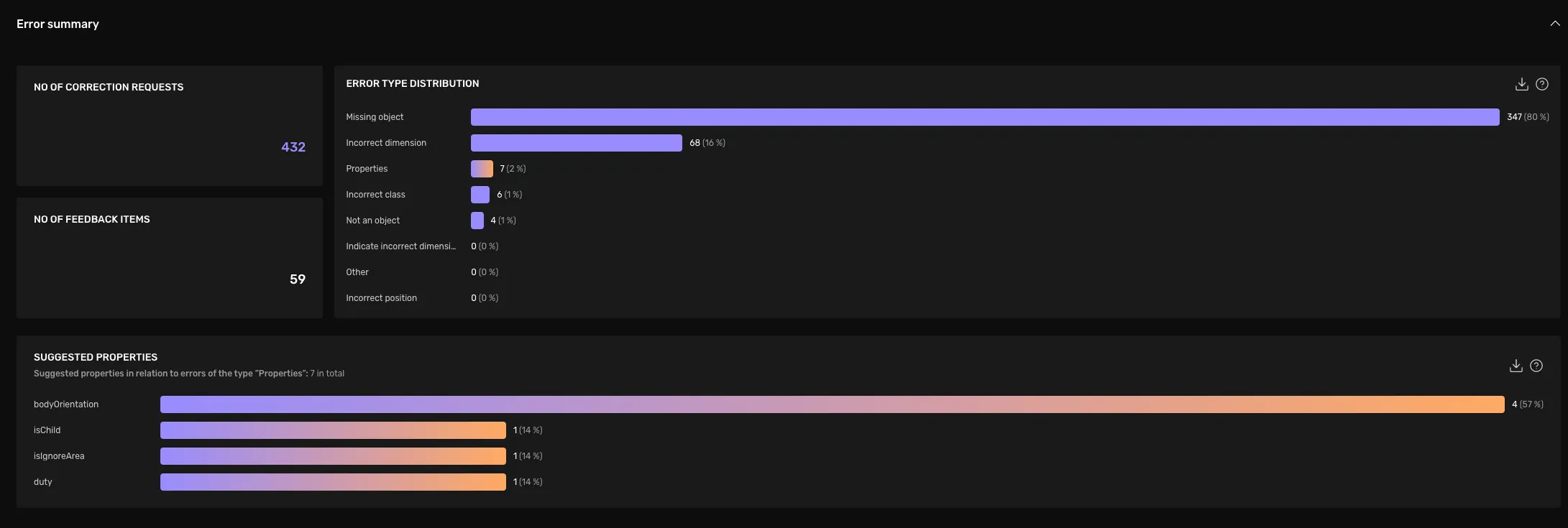
With the Error summary you get insight into what issues reviewers have found and commented on during the phase's review tasks. It helps you understand the most common and less frequent identified issues.
The error summary insights are based on feedback items written by the phase's reviewers. Absolute numbers represent actual feedback items, not the edits made in response to the feedback.
No of Correction Requests
The number of feedback items of the type "Correction Requests". This is the sum of all errors shown in the "Error Type Distribution" to the right.
No of Feedback Items
The number of feedback items of the type "Advice". These are excluded from the chart "Error Type Distribution" and "Suggested properties".
Error Type Distribution
Shows the absolute count and relative share of all feedback items categorized as "Correction Requests", grouped by their error type.
Suggested Properties
For those items with the error type Properties, this shows the distribution of properties that we affected. Each error indicated as Properties has a single property connected to it.
Individual Feedback Items
This section helps you to get an overview of all given feedback, to answer questions such as:
- How detailed and critical is the feedback of my colleague reviewers?
- Are the reviewers giving valid feedback given the current guideline?
- What is feedback where the reviewer and annotator are discussing in the comments?
- How does feedback of type "MissingObject" look?
- What type of feedback is marked as "invalid"?
The items are split up by their feedback type.
Correction Requests
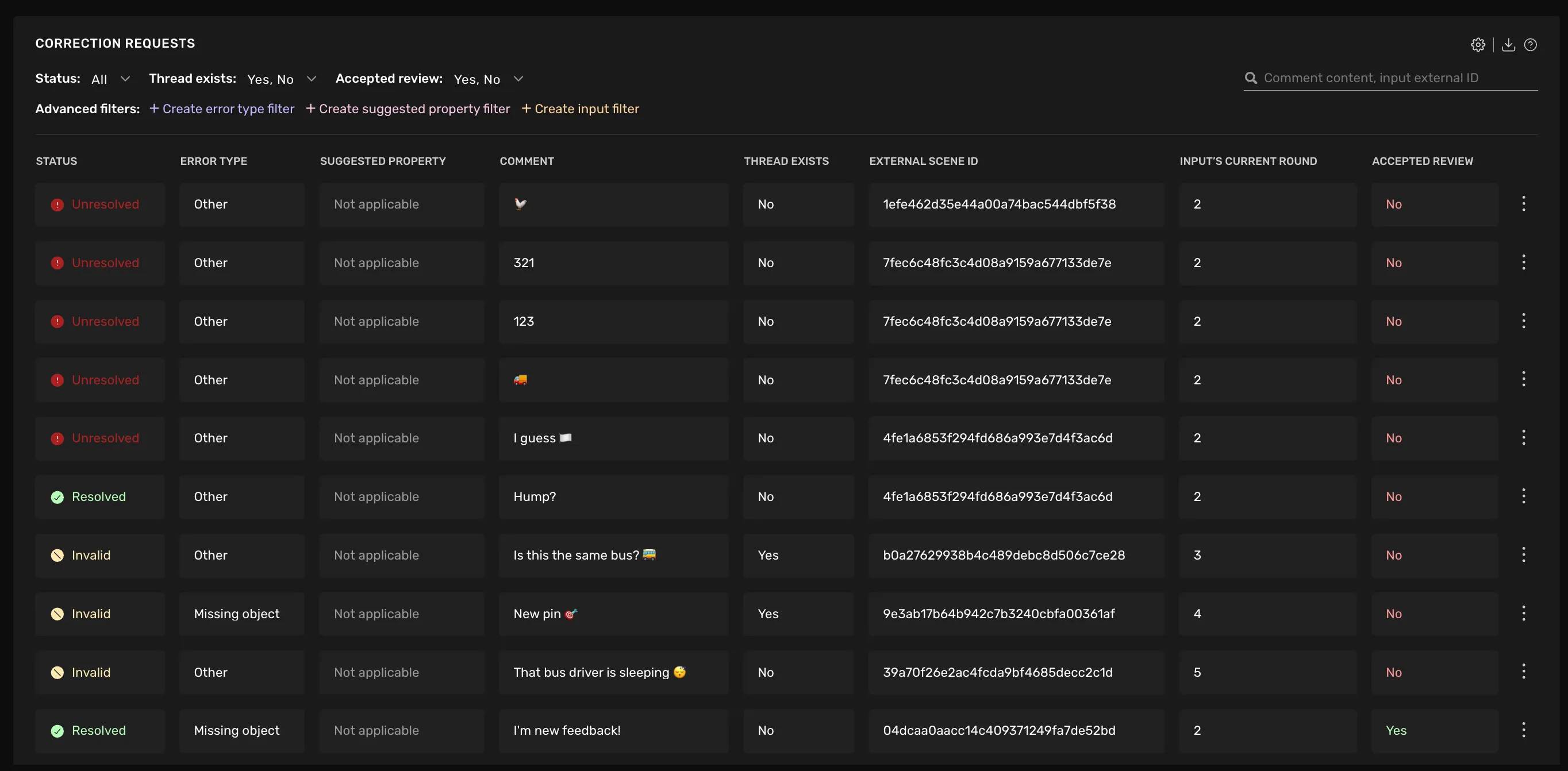
In this section, you see feedback items for the type Correction Request. These are things that the reviewer wants to get corrected before accepting the review.
You can filter the feedback items by their Resolved status, the Error type, whether a discussion thread exists, or whether the overall Review of the input has been accepted yet.
Below is a description of what information is available for each correction request.
Status
Status | Comment |
|---|---|
Unresolved | When created by the reviewer, and not yet approved |
Corrected | When the annotator has fixed the issue mentioned in the correction request. |
Resolved | When the reviewer has approved the annotators fix. |
Invalid | An item can be marked as "Invalid" by the user if they think it's not accurate with respect to the guidelines of the task, this can be due to mistakes in machine-generated feedback or from human reviewers. |
An item can be "Unresolved" even if the overall Review was accepted, or the other way around.
Error Type The type of error that was selected in the Correction Request.
Suggested property If the Error type is "Properties", this column shows which property and value was suggested by the reviewer.
Comment Shows the description that the reviewer might have given.
Thread exists Will say "Yes", if there was any reply to the item, i.e. a discussion thread has been started in relation to the item.
External Scene ID The scene ID of the reviewed annotation.
Current Round The review round in which the input of this feedback item currently is. All inputs start in round 1. With each rejected review, they progress 1 round forward.
Accepted Review Whether the overall Review was accepted or not.
Feedback
In this section you see feedback items of the type Advice. As the underlying data has less structure, the table has fewer columns and filtering options, but otherwise, it looks the same as the one above.