Processing Errors
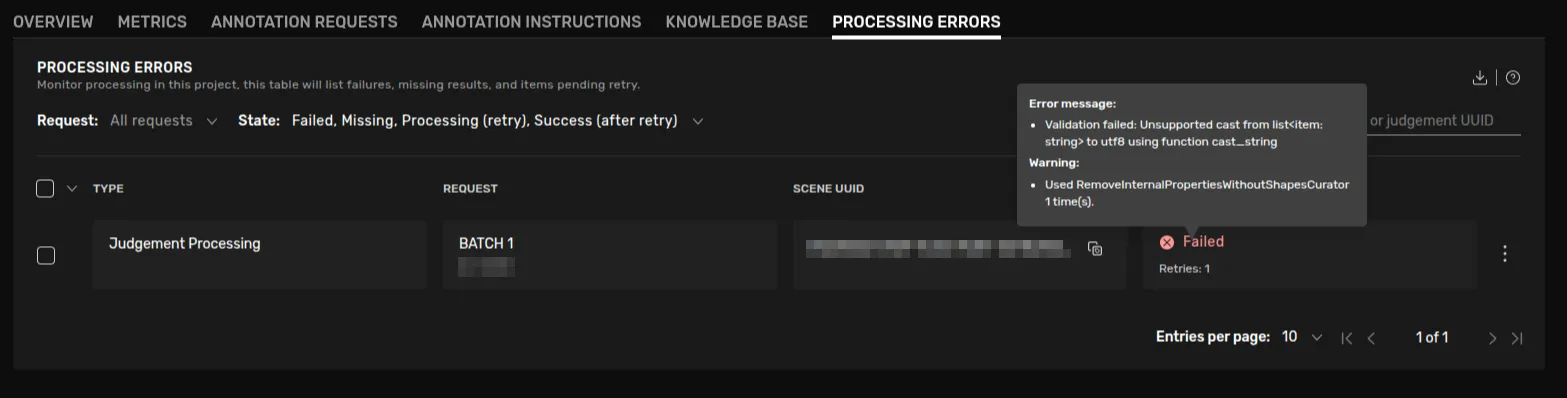
The results of a task is processed by the systems in various ways. For instance we produce a dense representation of the produced data from the original format which is sparse. We also convert the data to a number of different format for various downstream processing purposes.
This processing can fail in various ways due to outages, misconfiguration and bugs. In order to make such failures visible and actionable, there's a tab called Processing Errors placed in the Project Management Tooling.
Failed and missing processing results can lead to scenes not being exported or processed as expected.
Overview
The default filters shows a project's Failed and Missing processing items. When something is missing it means that a result has not been produced within the expected time frame. Users can retry items that have failed or that are missing, and in order for these items to not fall out of view, the default filters also show items that are being retried or that have succeeded after one or more retries.
By changing the filter selection a user can also view successful and pending processing items. There is also a filter for request, to limit the items visible to those of a selection of requests. Successful processing items are saved for a month, failed processing items are saved for a year but may be manually deleted before that.
This view is available for users that have the role Admin or Developer in the project's workspace.
Retry item
Failed and Missing items can be retried. Items are then placed in the state Processing (retry), and the system will try to process the item again. In the case of repeated failures, please contact support. The option to retry an item is available by clicking an item's context menu (the three vertical dots to the right), or by selecting one or more items with the checkbox to the left on each row and using the batch action menu that is shown at the bottom of the page if any items are selected.
Delete item
Items that are Failed or Missing can be deleted manually, if the user wants to hide the processing information. One potential use for this function is to hide information regarding an experimental request or a proof of concept where misconfiguration might be expected. The delete functionality is available in the same location as the retry functionality. Please note that deleting an item makes it impossible to retry, and thus could lead to data loss.