Client QA
The Client QA Phase is part of the Kognic Standard Workflow, which aims to enable the delivery of sufficient-quality annotations on time and at the expected cost.
Overview
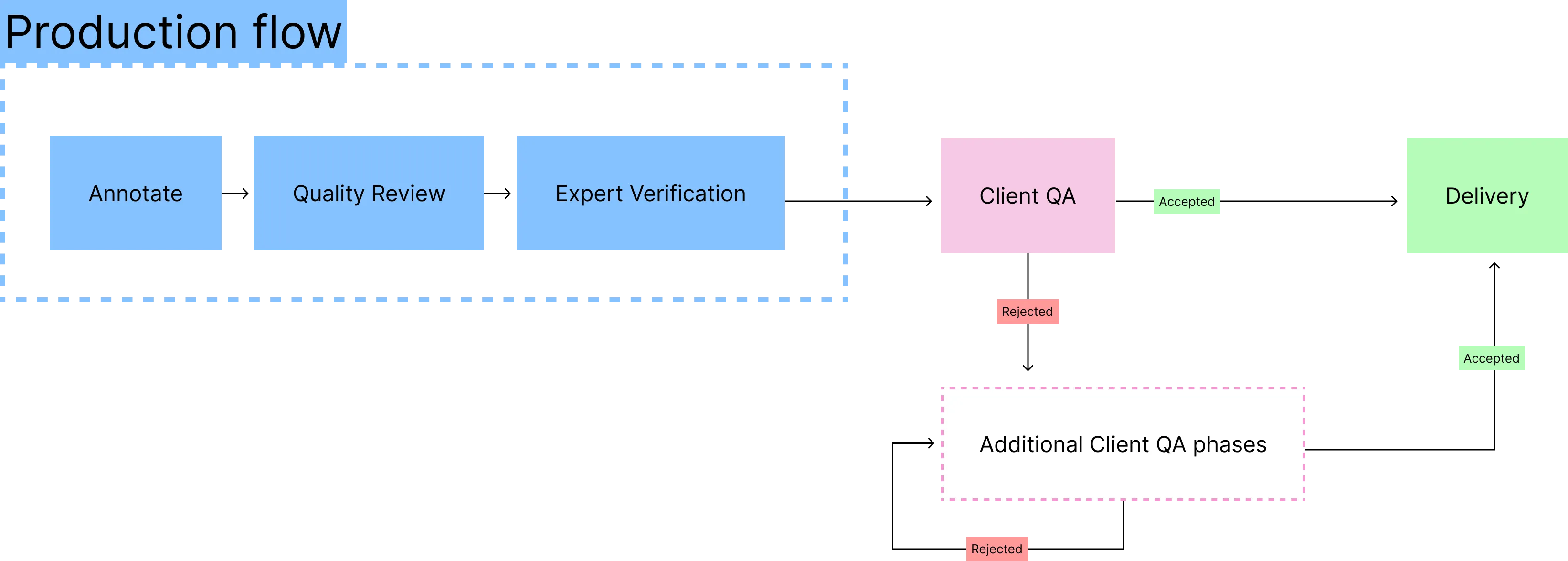
The Client QA phase is a structured handoff stage that sits between the production flow and final delivery. It gives clients a formal opportunity to review annotation quality, provide feedback, and submit a verdict before delivery is confirmed. If quality does not meet the agreed acceptance criteria, a structured alignment and rework process ensures issues are resolved efficiently before the next review.
The Client QA phase fits into the Kognic Standard Workflow as follows:
When to use this phase
Client QA is used when a client wants to verify that delivered annotations meet agreed quality standards before the data is considered final.
Workflow variants
When you create a request, you choose which Client QA workflow to use:
- Client QA - the standard workflow. After quality is accepted, corrected inputs move directly to Delivery.
- Client QA with Follow-up review After quality is accepted, rejected inputs go through a re-review loop before reaching Delivery. This gives the client a chance to verify that corrections meet their expectations, even when they accepted the full delivery.
Both workflows share the same review, verdict, and rework stages described on this page. The only difference is what happens to rejected inputs after quality is accepted. See Follow-up Review under Rework: Accepted quality for details.
End state
Client QA ends when the overall quality verdict is Accepted, either directly by the client, or jointly after Verdict Verification. Once accepted, remaining corrections are completed and all inputs move to the Delivery phase.
If quality is rejected, additional Client QA phases may follow rework until acceptance is reached.
Phase stages
A single Client QA phase consists of the following stages:
- Client Review: The client samples and reviews annotations, then submits a quality verdict.
- Verdict Verification (only when the client rejects): The producer reviews the rejection rationale and either verifies or adjusts the verdict.
- Rework: The producer corrects annotations based on the joint verdict.
- Delivery: Accepted and corrected inputs are delivered.
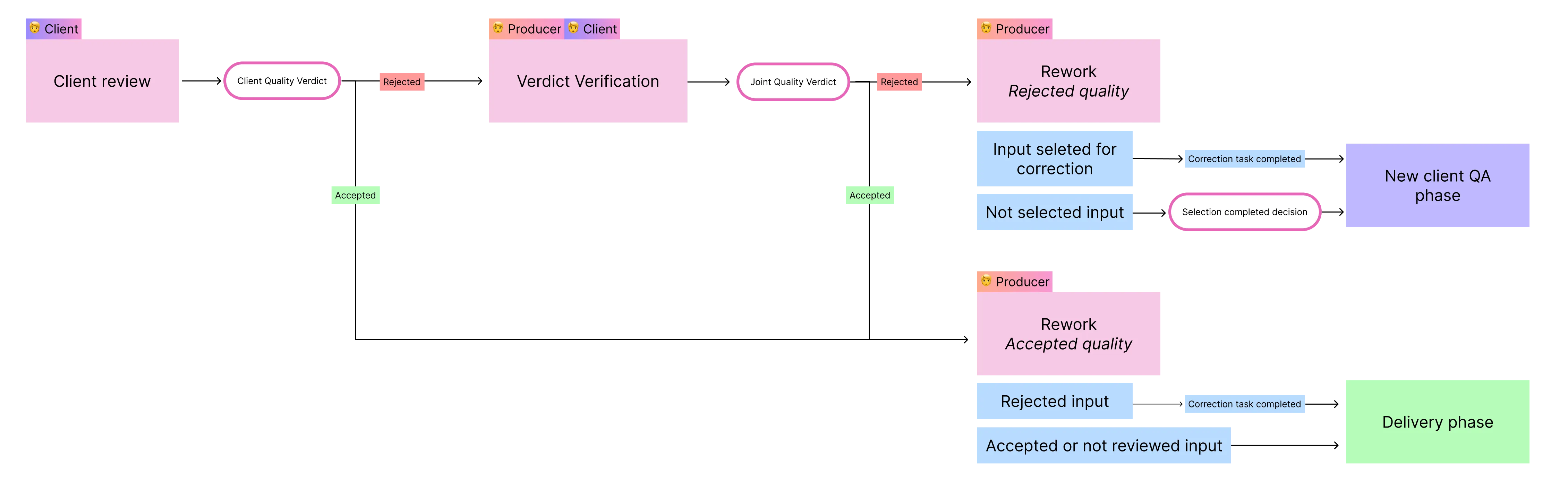
ℹ️ Note that the flow chart shows the regular Client QA phase. If you want to see how the flow changes when Follow-up review is activated, you can do so in the section Rework: Accepted quality.
Stage: Client Review
What happens here
The client team reviews a representative sample of the produced annotations to determine whether the overall annotation quality meets the communicated acceptance criteria.
How to sample inputs
Inputs can be sampled in two ways:
- Manual sampling: Select individual inputs or a batch of inputs from the phase inputs table. The table shows supporting metrics, including the number of objects and shapes per input.
- Automatic input sampling: Configure an automatic sampling level. The platform tracks both actual sample size (inputs where review is complete) and planned sample size (inputs completed, in review, or waiting for review) across inputs, objects, and shapes.
Quality metrics
During Client Review, feedback-based quality metrics are calculated for the reviewed annotations and made visible to both the client and the producer. The metrics are provided both on an aggregated phase level and individually for all inputs that have been reviewed. The following metrics are available:
Metric | Aggregated (phase level) | Per input |
|---|---|---|
Reviewed shapes | Total number of annotated shapes in inputs that have completed review. Includes false positives, excludes false negatives. | - |
Shapes with feedback | Percentage of reviewed shapes with feedback attached. (Shapes with feedback / Reviewed shapes) × 100 | Percentage of reviewed shapes with feedback attached. |
False positives | Percentage of reviewed shapes given feedback with the error type "Not an object". (Shapes with "Not an object" feedback / Reviewed shapes) × 100 | Percentage of reviewed shapes given feedback with the error type "Not an object". |
False negatives | Percentage of missed shapes during annotation (error type "Missing object"). ("Missing object" feedback items / (Reviewed shapes + "Missing object" feedback items)) × 100 | Percentage of missed shapes during annotation (error type "Missing object"). |
Shapes with geometry errors | Percentage of reviewed shapes with feedback for "Incorrect dimension", "Incorrect position", or "Incorrect layer order". (Shapes with these error types / Reviewed shapes) × 100 | Percentage of reviewed shapes with feedback for "Incorrect dimension", "Incorrect position", or "Incorrect layer order". |
Shapes with property errors | Percentage of reviewed shapes with feedback for "Incorrect class" or "Properties". (Shapes with these error types / Reviewed shapes) × 100 | Percentage of reviewed shapes with feedback for "Incorrect class" or "Properties". |
Scene property errors | The percentage of scene property errors across all frames and sources. The percentage of scene property errors across all frames and sources. Scene properties describe the scene (e.g., weather, vehicle speed, lighting). Each property type contributes potential errors based on its scope: - Static global: 1 potential error per property (applies to entire scene) - Static source-specific: 1 potential error per property per source - Dynamic global: 1 potential error per property per frame - Dynamic source-specific: 1 potential error per property per frame per source Error rate = (Total actual errors) / (Total potential errors) × 100 | The percentage of scene property errors across all of the input’s frames and sources. |
Quality metrics are calculated from feedback items. For metrics to be meaningful, the client must provide structured, categorized feedback during review. Feedback without proper categorization will not be reflected in the metrics. See How to write feedback for trustworthy quality metrics for best practices.
Disputed feedback items are excluded from all quality metric calculations.
Submitting a verdict
Once the client has reviewed a sufficiently sized sample and evaluated the annotation quality, they submit a verdict:
- Accept: The overall quality meets the acceptance criteria. Only the specific errors found during review need to be corrected.
- Reject: The overall quality does not meet acceptance criteria. A broader rework is required.
When a verdict is submitted, all open and ongoing review tasks are closed, any in-progress work on those tasks is lost, and no new inputs can be selected for review. The phase then moves in one of two directions:
- Reject → Verdict Verification
- Accept → Rework (Accepted quality)
Stage: Verdict Verification
This stage only occurs when the client submits a Reject verdict.
What happens here
The producer reviews the client's rejection rationale, the feedback-based quality metrics, and individual feedback items to determine whether the rejection is well-founded. The producer may also contact the client to clarify any feedback or resolve misunderstandings.
Based on this review, the producer reaches a joint quality verdict:
- Verify (Rejected): The producer agrees that the quality does not meet acceptance criteria. The phase moves to Rework: Rejected quality.
- Adjust (Accepted): Following review and clarification with the client, the producer determines the quality meets acceptance criteria. The joint verdict becomes Accepted, and the phase moves to Rework: Accepted quality.
Disputing feedback items
Before submitting the joint verdict, the producer can dispute individual feedback items they believe are incorrect. Only users with the producer role can initiate disputes. Disputes are managed through the Correction Request table in the Client QA tab, where one or more items can be disputed at a time. Disputed feedback is excluded from quality metrics and correction tasks — which may change the overall quality picture and inform the joint verdict. Either the producer or the client can dismiss a dispute before the joint verdict is submitted, which reinstates the feedback in metrics and corrections. Both disputing and dismissing require a written reason. Once the joint verdict is submitted, any remaining disputes are final — disputed items are permanently excluded from metrics and corrections.
Disputing feedback items is a phase-level action in Client QA — it is separate from task-level feedback interactions such as replying to, resolving, or marking feedback as invalid in the Task View.
Stage: Rework
The Rework stage differs depending on whether the joint verdict is Rejected or Accepted.
Rework: Rejected quality
When the joint verdict is Rejected, no inputs are sent for correction automatically. You select what needs correcting in the phase inputs table.
A rejected quality verdict does not reject the individual inputs inside it. Each input keeps its own review verdict, so a phase whose quality was rejected still contains inputs the client accepted.
Selecting inputs for correction
Selecting an input sends it for correction. Every input in the phase has one of two outcomes:
- Selected. A correction task is created. The input moves to the next Client QA phase as soon as that correction is submitted.
- Not selected. The input is untouched. It moves to the next Client QA phase when you mark the selection as completed.
You must select every input the client rejected. You cannot mark the selection as completed until they have all been sent for correction.
Inputs the client accepted or did not review do not have to be corrected, and are usually left unselected. Use the client's rejection rationale and the quality metrics to decide whether any of them need work as well, which is more common for non-reviewed inputs.
When sending inputs for correction, you can attach additional feedback. This feedback is applied to all currently selected inputs and appears as a feedback item in the resulting correction tasks. Use this to communicate high-level instructions, such as systematic issues identified during Client Review.
Input information available
- Review status (rejected, accepted, or not reviewed by the client)
- Number of objects and shapes
Completing the selection
Mark selection as completed is a phase-level action. There is no way to mark an individual input as done. The one action moves every input that is not in correction to the next Client QA phase at once.
You will find it in two places during Rework: step 3 of the Rework to-do list, and the top right of the Rework selection panel above the phase inputs table.
Finish selecting before you use it. Anything still unselected at that point moves to the next phase uncorrected.
Inputs that are not selected do not advance on their own. They stay in the phase until you mark the selection as completed.
Marking the selection as completed does not affect inputs already in correction. Those move on as soon as their correction tasks are submitted, whether or not you have marked the selection as completed.
After rework, a new Client QA phase is created, allowing the client to review the corrected annotations. The new phase starts a fresh Client Review, so the client reviews from scratch.
Rework: Accepted quality
When the joint verdict is Accepted (either directly from Client Review, or revised to Accepted during Verdict Verification), inputs are handled as follows. This describes the standard Client QA workflow, see Follow-up Review below for that variant.
- Client-rejected inputs: Automatically sent for correction.
- Client-accepted or non-reviewed inputs: Move directly to the Delivery phase and are considered delivered immediately.
Once correction tasks are completed, the corrected inputs also move to the Delivery phase. Once all inputs reach Delivery, the request is complete.
Follow-up Review
When you select the Client QA with Follow-up Review workflow for a request, rejected inputs don't move straight to Delivery after correction. Instead, a Follow-up phase is added between Client QA and Delivery.
In the Follow-up phase, the client re-reviews corrected inputs. Inputs cycle through Review → Correct until the client accepts them. Accepted and non-reviewed inputs are not affected, they move to Delivery as usual.

Delivery
Once all inputs have been accepted and any required corrections have been completed, they move to the Delivery phase. The request is then considered complete.
Frequently asked questions